We’ll start by building a simple web server and then move on to configuring the database, building the Note model and different routes for handling all the CRUD operations.
Finally, we’ll test our REST APIs using Postman.
Well! Now that we know what we are going to build, We need a cool name for our application. Let’s call our application EasyNotes.
Creating the Application
1. Fire up your terminal and create a new folder for the application.
$ mkdir node-easy-notes-app
2. Initialize the application with a package.json file
Go to the root folder of your application and type npm init to initialize your app with a package.json file.
$ cd node-easy-notes-app
$ npm init
$ npm init
name: (node-easy-notes-app)
version: (1.0.0)
description: Never miss a thing in Life. Take notes quickly. Organize and keep track of all your notes.
entry point: (index.js) server.js
test command:
git repository:
keywords: Express RestAPI MongoDB Mongoose Notes
author: callicoder
license: (ISC) MIT
About to write to /Users/rajeevkumarsingh/node-easy-notes-app/package.json:
{
"name": "node-easy-notes-app",
"version": "1.0.0",
"description": "Never miss a thing in Life. Take notes quickly. Organize and keep track of all your notes.",
"main": "server.js",
"scripts": {
"test": "echo \"Error: no test specified\" && exit 1"
},
"keywords": [
"Express",
"RestAPI",
"MongoDB",
"Mongoose",
"Notes"
],
"author": "callicoder",
"license": "MIT"
}
Is this ok? (yes) yes
version: (1.0.0)
description: Never miss a thing in Life. Take notes quickly. Organize and keep track of all your notes.
entry point: (index.js) server.js
test command:
git repository:
keywords: Express RestAPI MongoDB Mongoose Notes
author: callicoder
license: (ISC) MIT
About to write to /Users/rajeevkumarsingh/node-easy-notes-app/package.json:
{
"name": "node-easy-notes-app",
"version": "1.0.0",
"description": "Never miss a thing in Life. Take notes quickly. Organize and keep track of all your notes.",
"main": "server.js",
"scripts": {
"test": "echo \"Error: no test specified\" && exit 1"
},
"keywords": [
"Express",
"RestAPI",
"MongoDB",
"Mongoose",
"Notes"
],
"author": "callicoder",
"license": "MIT"
}
Is this ok? (yes) yes
Note that I’ve specified a file named server.js as the entry point of our application. We’ll create server.js file in the next section.
3. Install dependencies
We will need express, mongoose and body-parser modules in our application. Let’s install them by typing the following command -
$ npm install express body-parser mongoose --save
I’ve used --save option to save all the dependencies in the package.json file. The final package.json file looks like this -
{
"name": "node-easy-notes-app",
"version": "1.0.0",
"description": "Never miss a thing in Life. Take notes quickly. Organize and keep track of all your notes.",
"main": "server.js",
"scripts": {
"test": "echo \"Error: no test specified\" && exit 1"
},
"keywords": [
"Express",
"RestAPI",
"MongoDB",
"Mongoose",
"Notes"
],
"author": "callicoder",
"license": "MIT",
"dependencies": {
"body-parser": "^1.18.2",
"express": "^4.16.2",
"mongoose": "^4.13.6"
}
}
"name": "node-easy-notes-app",
"version": "1.0.0",
"description": "Never miss a thing in Life. Take notes quickly. Organize and keep track of all your notes.",
"main": "server.js",
"scripts": {
"test": "echo \"Error: no test specified\" && exit 1"
},
"keywords": [
"Express",
"RestAPI",
"MongoDB",
"Mongoose",
"Notes"
],
"author": "callicoder",
"license": "MIT",
"dependencies": {
"body-parser": "^1.18.2",
"express": "^4.16.2",
"mongoose": "^4.13.6"
}
}
Our application folder now has a package.json file and a node_modules folder -
node-easy-notes-app
└── node_modules/
└── package.json
└── node_modules/
└── package.json
Setting up the web server
Let’s now create the main entry point of our application. Create a new file named server.js in the root folder of the application with the following contents -
var express = require('express');
var bodyParser = require('body-parser');
// create express app
var app = express();
// parse requests of content-type - application/x-www-form-urlencoded
app.use(bodyParser.urlencoded({ extended: true }))
// parse requests of content-type - application/json
app.use(bodyParser.json())
// define a simple route
app.get('/', function(req, res){
res.json({"message": "Welcome to EasyNotes application. Take notes quickly. Organize and keep track of all your notes."});
});
// listen for requests
app.listen(3000, function(){
console.log("Server is listening on port 3000");
});
var bodyParser = require('body-parser');
// create express app
var app = express();
// parse requests of content-type - application/x-www-form-urlencoded
app.use(bodyParser.urlencoded({ extended: true }))
// parse requests of content-type - application/json
app.use(bodyParser.json())
// define a simple route
app.get('/', function(req, res){
res.json({"message": "Welcome to EasyNotes application. Take notes quickly. Organize and keep track of all your notes."});
});
// listen for requests
app.listen(3000, function(){
console.log("Server is listening on port 3000");
});
First, We import express and body-parser modules. Express, as you know, is a web framework that we’ll be using for building the REST APIs, and body-parser is a module that parses the request (of various content types) and creates a req.body object that we can access in our routes.
Then, We create an express app, and add two body-parser middlewares using express’s app.use() method. A middleware is a function that has access to the request and response objects. It can execute any code, transform the request object, or return a response.
Then, We define a simple GET route which returns a welcome message to the clients.
Finally, We listen on port 3000 for incoming connections.
All right! Let’s now run the server and go to http://localhost:3000 to access the route we just defined.
$ node server.js
Server is listening on port 3000
Server is listening on port 3000
Configuring and Connecting to the database
I like to keep all the configurations for the app in a separate folder. Let’s create a new folder config in the root folder of our application for keeping all the configurations -
$ mkdir config
$ cd config
$ cd config
Now, Create a new file database.config.js inside config folder with the following contents -
module.exports = {
url: 'mongodb://localhost:27017/easy-notes'
}
url: 'mongodb://localhost:27017/easy-notes'
}
We’ll now import the above database configuration in server.js and connect to the database using mongoose.
Add the following code to the server.js file after app.use(bodyParser.json()) line -
// Configuring the database
var dbConfig = require('./config/database.config.js');
var mongoose = require('mongoose');
mongoose.connect(dbConfig.url, {
useMongoClient: true
});
mongoose.connection.on('error', function() {
console.log('Could not connect to the database. Exiting now...');
process.exit();
});
mongoose.connection.once('open', function() {
console.log("Successfully connected to the database");
})
var dbConfig = require('./config/database.config.js');
var mongoose = require('mongoose');
mongoose.connect(dbConfig.url, {
useMongoClient: true
});
mongoose.connection.on('error', function() {
console.log('Could not connect to the database. Exiting now...');
process.exit();
});
mongoose.connection.once('open', function() {
console.log("Successfully connected to the database");
})
Please run the server and make sure that you’re able to connect to the database -
$ node server.js
Server is listening on port 3000
Successfully connected to the database
Server is listening on port 3000
Successfully connected to the database
Defining the Note model in Mongoose
Next, We will define the Note model. Create a new folder called app inside the root folder of the application, then create another folder called models inside the app folder -
$ mkdir -p app/models
$ cd app/models
$ cd app/models
Now, create a file called note.model.js inside app/models folder with the following contents -
var mongoose = require('mongoose');
var NoteSchema = mongoose.Schema({
title: String,
content: String
}, {
timestamps: true
});
module.exports = mongoose.model('Note', NoteSchema);
var NoteSchema = mongoose.Schema({
title: String,
content: String
}, {
timestamps: true
});
module.exports = mongoose.model('Note', NoteSchema);
The Note model is very simple. It contains a title and a content field. I have also added a timestamps option to the schema.
Mongoose uses this option to automatically add two new fields - createdAt and updatedAt to the schema.
Defining Routes using Express
Next up is the routes for the Notes APIs. Create a new folder called routes inside the app folder.
$ mkdir app/routes
$ cd app/routes
$ cd app/routes
Now, create a new file called note.routes.js inside app/routes folder with the following contents -
module.exports = function(app) {
var notes = require('../controllers/note.controller.js');
// Create a new Note
app.post('/notes', notes.create);
// Retrieve all Notes
app.get('/notes', notes.findAll);
// Retrieve a single Note with noteId
app.get('/notes/:noteId', notes.findOne);
// Update a Note with noteId
app.put('/notes/:noteId', notes.update);
// Delete a Note with noteId
app.delete('/notes/:noteId', notes.delete);
}
var notes = require('../controllers/note.controller.js');
// Create a new Note
app.post('/notes', notes.create);
// Retrieve all Notes
app.get('/notes', notes.findAll);
// Retrieve a single Note with noteId
app.get('/notes/:noteId', notes.findOne);
// Update a Note with noteId
app.put('/notes/:noteId', notes.update);
// Delete a Note with noteId
app.delete('/notes/:noteId', notes.delete);
}
Note that We have added a require statement for note.controller.js file. We’ll define the controller file in the next section. The controller will contain methods for handling all the CRUD operations.
Before defining the controller, let’s first include the routes in server.js. Add the following require statement before app.listen() line inside server.js file.
// ........
// Require Notes routes
require('./app/routes/note.routes.js')(app);
// ........
// Require Notes routes
require('./app/routes/note.routes.js')(app);
// ........
If you run the server now, you’ll get the following error -
$ node server.js
module.js:472
throw err;
^
Error: Cannot find module '../controllers/note.controller.js'
module.js:472
throw err;
^
Error: Cannot find module '../controllers/note.controller.js'
This is because we haven’t defined the controller yet. Let’s do that now.
Writing the Controller functions
Create a new folder called controllers inside the app folder, then create a new file called note.controller.js inside app/controllers folder with the following contents -
var Note = require('../models/note.model.js');
exports.create = function(req, res) {
// Create and Save a new Note
};
exports.findAll = function(req, res) {
// Retrieve and return all notes from the database.
};
exports.findOne = function(req, res) {
// Find a single note with a noteId
};
exports.update = function(req, res) {
// Update a note identified by the noteId in the request
};
exports.delete = function(req, res) {
// Delete a note with the specified noteId in the request
};
exports.create = function(req, res) {
// Create and Save a new Note
};
exports.findAll = function(req, res) {
// Retrieve and return all notes from the database.
};
exports.findOne = function(req, res) {
// Find a single note with a noteId
};
exports.update = function(req, res) {
// Update a note identified by the noteId in the request
};
exports.delete = function(req, res) {
// Delete a note with the specified noteId in the request
};
Let’s now look at the implementation of the above controller functions one by one -
Creating a new Note
exports.create = function(req, res) {
// Create and Save a new Note
if(!req.body.content) {
res.status(400).send({message: "Note can not be empty"});
}
var note = new Note({title: req.body.title || "Untitled Note", content: req.body.content});
note.save(function(err, data) {
console.log(data);
if(err) {
console.log(err);
res.status(500).send({message: "Some error occurred while creating the Note."});
} else {
res.send(data);
}
});
};
// Create and Save a new Note
if(!req.body.content) {
res.status(400).send({message: "Note can not be empty"});
}
var note = new Note({title: req.body.title || "Untitled Note", content: req.body.content});
note.save(function(err, data) {
console.log(data);
if(err) {
console.log(err);
res.status(500).send({message: "Some error occurred while creating the Note."});
} else {
res.send(data);
}
});
};
Retrieving all Notes
exports.findAll = function(req, res) {
// Retrieve and return all notes from the database.
Note.find(function(err, notes){
if(err) {
res.status(500).send({message: "Some error occurred while retrieving notes."});
} else {
res.send(notes);
}
});
};
// Retrieve and return all notes from the database.
Note.find(function(err, notes){
if(err) {
res.status(500).send({message: "Some error occurred while retrieving notes."});
} else {
res.send(notes);
}
});
};
Retrieving a single Note
exports.findOne = function(req, res) {
// Find a single note with a noteId
Note.findById(req.params.noteId, function(err, data) {
if(err) {
res.status(500).send({message: "Could not retrieve note with id " + req.params.noteId});
} else {
res.send(data);
}
});
};
// Find a single note with a noteId
Note.findById(req.params.noteId, function(err, data) {
if(err) {
res.status(500).send({message: "Could not retrieve note with id " + req.params.noteId});
} else {
res.send(data);
}
});
};
Updating a Note
exports.update = function(req, res) {
// Update a note identified by the noteId in the request
Note.findById(req.params.noteId, function(err, note) {
if(err) {
res.status(500).send({message: "Could not find a note with id " + req.params.noteId});
}
note.title = req.body.title;
note.content = req.body.content;
note.save(function(err, data){
if(err) {
res.status(500).send({message: "Could not update note with id " + req.params.noteId});
} else {
res.send(data);
}
});
});
};
// Update a note identified by the noteId in the request
Note.findById(req.params.noteId, function(err, note) {
if(err) {
res.status(500).send({message: "Could not find a note with id " + req.params.noteId});
}
note.title = req.body.title;
note.content = req.body.content;
note.save(function(err, data){
if(err) {
res.status(500).send({message: "Could not update note with id " + req.params.noteId});
} else {
res.send(data);
}
});
});
};
Deleting a Note
exports.delete = function(req, res) {
// Delete a note with the specified noteId in the request
Note.remove({_id: req.params.noteId}, function(err, data) {
if(err) {
res.status(500).send({message: "Could not delete note with id " + req.params.id});
} else {
res.send({message: "Note deleted successfully!"})
}
});
};
// Delete a note with the specified noteId in the request
Note.remove({_id: req.params.noteId}, function(err, data) {
if(err) {
res.status(500).send({message: "Could not delete note with id " + req.params.id});
} else {
res.send({message: "Note deleted successfully!"})
}
});
};
Testing our APIs
Creating a new Note using POST /notes API

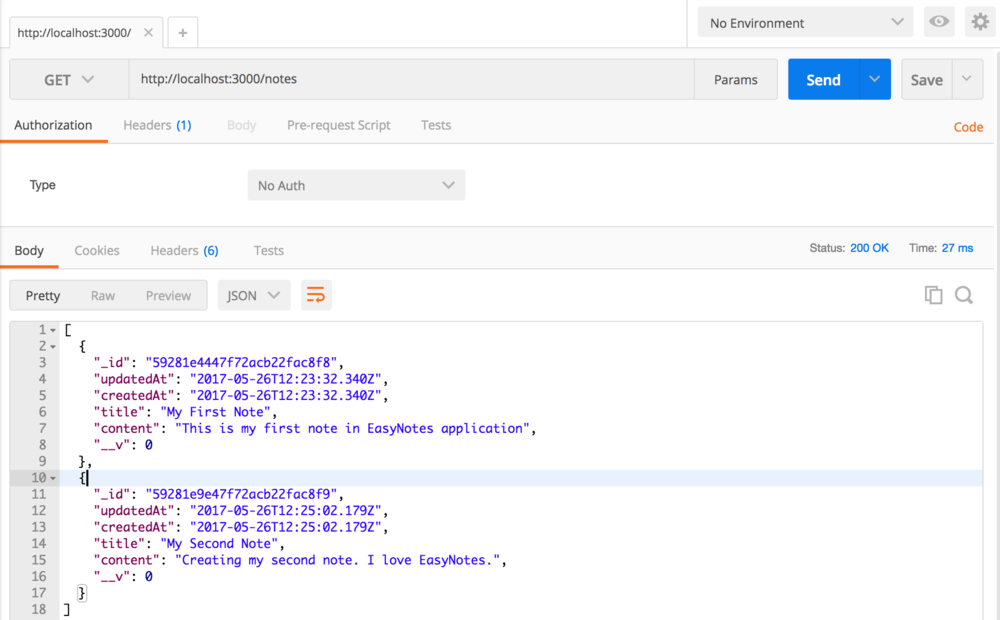
Retrieving all Notes using GET /notes API
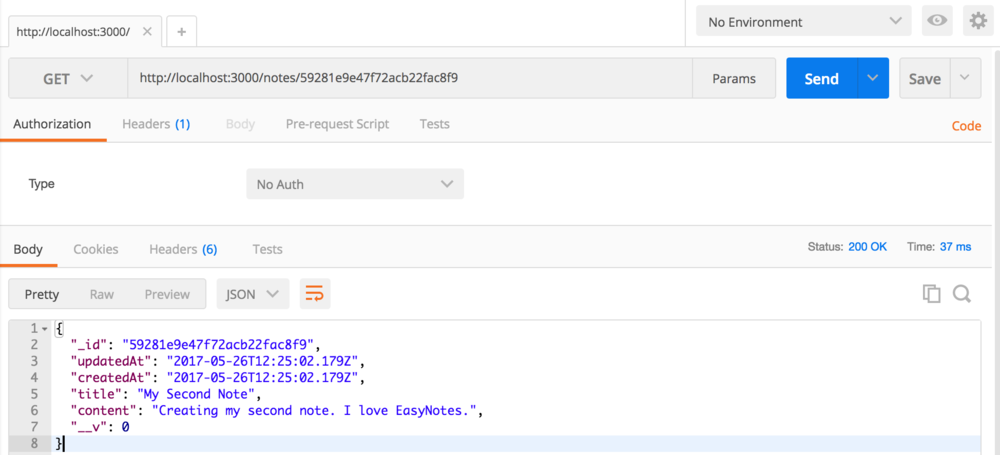
Retrieving a single Note using GET /notes/:noteId API
Updating a Note using PUT /notes/:noteId API

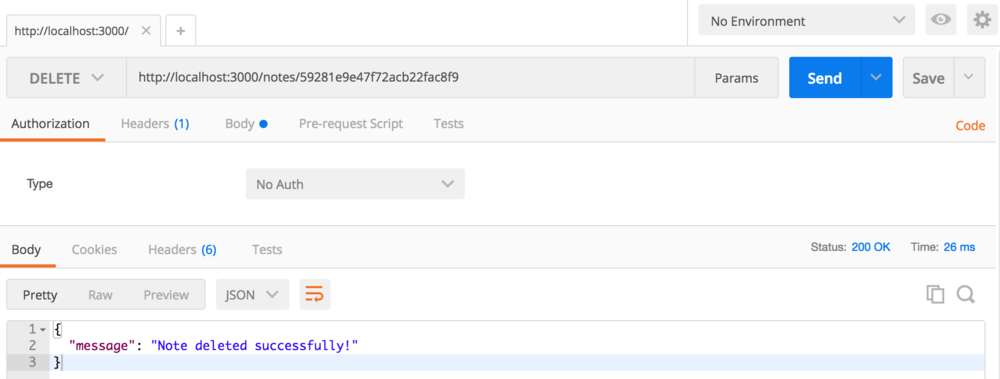
Deleting a Note using DELETE /notes/:noteId API